> For the complete documentation index, see [llms.txt](https://gut-analysis-toolbox.gitbook.io/docs/llms.txt). Markdown versions of documentation pages are available by appending `.md` to page URLs; this page is available as [Markdown](https://gut-analysis-toolbox.gitbook.io/docs/9.-gatv2.md).
# 9. GATv2
Set up, launch and navigate GAT v2 — start here.
GAT v2 brings the whole Gut Analysis Toolbox into a **single, guided Fiji plugin**. From one window you can count neurons, detect neuronal subtypes and ganglia, run spatial analysis, analyse calcium imaging and align multiplex images.
New to GAT? Work through this page top to bottom, then pick the workflow that matches your data.
## What's new compared to v1
* **One guided window.** v1 was a collection of macros scattered in the Fiji menus; v2 is a single plugin with tabbed forms and inline tips.
* **Same science, easier to drive.** The underlying deep-learning models are the same (StarDist for neurons/subtypes, DeepImageJ for ganglia) — v2 just makes them easier to run and combine.
* **v1 is still available.** The original v1 macros remain installed for existing workflows, so nothing you rely on disappears.
## Before you start (one-time setup)
GAT builds on a few free Fiji add-ons and AI models. You only need to do this **once**. Don't worry if it feels unfamiliar — when you first launch GAT it checks your setup and tells you, in plain language, anything that is still missing.
### Step 1 — Turn on the add-ons GAT needs
In Fiji, go to **Help ▸ Update…** and click **Manage update sites**. Tick the box next to each of these names:
* StarDist
* CSBDeep
* DeepImageJ
* TensorFlow
* IJPB-plugins
* clij
* clij2
* 3D ImageJ Suite
* BIG-EPFL
* PTBIOP
Click **Apply changes**, then **close and reopen Fiji**.
### Step 2 — Set TensorFlow to version 1.15
Once Fiji has reopened, go to **Edit ▸ Options ▸ TensorFlow…**, choose **TensorFlow 1.15.0 CPU** from the list, and **close and reopen Fiji** again. (This option only appears after you have done Step 1.) Detailed Instructions [here](/docs/home.md#installation-and-configuration) at bottom of the page.
That's it — you're ready to start GAT.
{% hint style="warning" %}
**Why TensorFlow 1.15?** GAT's AI models were built with TensorFlow 1. On Fiji's newer default (TensorFlow 2) neuron detection will crash. Step 2 fixes this - and it only works after you have done Step 1 and reopened Fiji.
{% endhint %}
{% hint style="info" %}
The first time you launch GAT it runs an **environment check** and reports anything missing (add-ons, models, or the wrong TensorFlow version) in the Fiji **Log** window. If GAT will not start, read the Log — it tells you exactly what to turn on. The first time you run a ganglia analysis, DeepImageJ also downloads the model files it needs automatically — this can take a minute, so just let it finish.
{% endhint %}
## Starting GAT
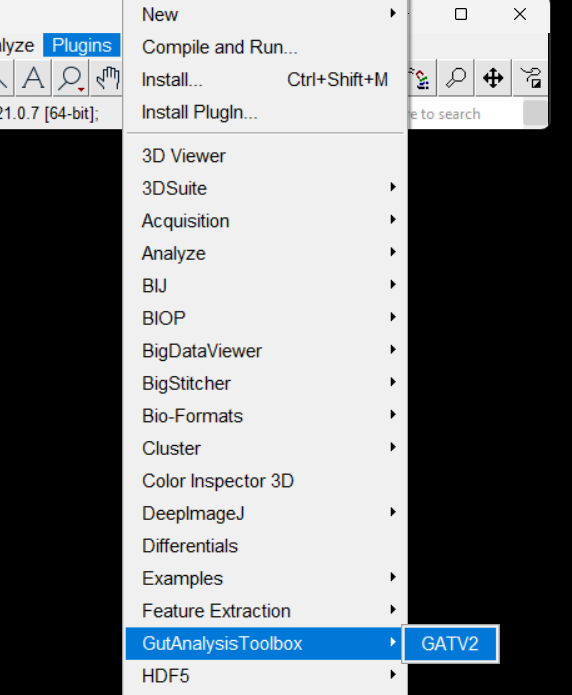
Open GAT from **Plugins ▸ GutAnalysisToolbox ▸ GATV2**.
Launch GAT from Plugins ▸ GutAnalysisToolbox ▸ GATV2
GAT runs its environment check and then opens the main window, where you choose a workflow.
## Navigating the GAT window
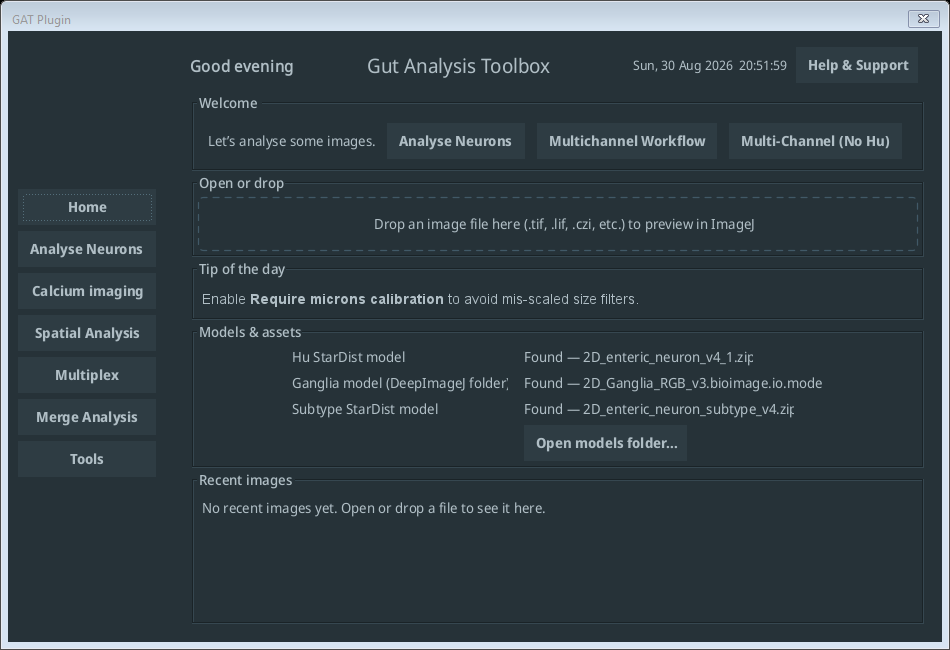
The GAT v2 home screen: workflow sidebar on the left, and a status panel showing your models are found
* **Pick a workflow** from the sidebar on the left — Analyse Neurons, Calcium imaging, Spatial Analysis, Multiplex, Merge Analysis or Tools.
* Each workflow uses **tabbed forms**:
* **Basic** — the inputs most users need: input image, channel numbers, output folder.
* **Markers** — (multichannel workflows) add or remove marker channels.
* **Advanced** — pixel size, rescaling and fine-tuning; leave as default unless you have a reason to change it.
* The blue **ℹ️ info icons** next to each field explain what to enter — click them if you are unsure.
* Detected cells appear in Fiji's **ROI Manager**, where you can add, delete or rename ROIs before saving.
* By default, results are saved to an **`Analysis`** folder next to your input image (a subfolder is created per image).
## Sample data
Every workflow in this guide uses freely available sample images. Download the full set from Zenodo: [**Sample data**](https://zenodo.org/doi/10.5281/zenodo.10590347). Individual images are also in the [Sample Images folder](https://github.com/pr4deepr/GutAnalysisToolbox/tree/main/Sample%20Images) on GitHub. Each workflow page names the specific image it uses.
## Choose your workflow
| Workflow | Use it to… |
| ---------------------------------------------------------------- | --------------------------------------------------------------- |
| [Analyse Neurons](/docs/9.-gatv2/analyse-neurons.md) | Count neurons (Hu), optionally cells per ganglia |
| [Multichannel – With Hu](/docs/9.-gatv2/multichannel-with-hu.md) | Count neurons **and** subtypes when you have a Hu channel |
| [Multichannel – No Hu](/docs/9.-gatv2/multichannel-no-hu.md) | Analyse subtypes without a pan-neuronal Hu label (experimental) |
| [Spatial Analysis](/docs/9.-gatv2/spatial-analysis.md) | Nearest-neighbour and cells-per-ganglia distributions |
| [Calcium Imaging](/docs/9.-gatv2/calcium-imaging.md) | Align stacks and extract calcium traces |
| [Multiplex](/docs/9.-gatv2/multiplex.md) | Align multi-round multiplex images |
| [Merge Analysis](/docs/9.-gatv2/merge-analysis.md) | Combine results from many images into one table |
| [Tools](/docs/9.-gatv2/tools.md) | Test rescaling, probability and ganglia expansion before a run |